
Menu

Taxation
16/12/2025
Reporting crypto on your UK Self Assessment: SA100, SA108

Marcello Ricci
Crypto Tax Writer
Filing your Self Assessment for crypto is often the moment when theory meets practice. You already know whether your crypto activity falls under capital gains or income; what you need now is a clear path for entering those figures into SA100, SA108 and Box 51 without mistakes. This guide focuses on how to extract all the data you need from the SA tax report generated by CryptoBooks and use it to complete your tax return correctly.
If you need the broader framework, how crypto is taxed in the UK, how pooling works, or how to classify different types of crypto activity, those explanations sit in our full crypto tax guide.
This section is strictly practical. Step by step, you’ll see how to prepare your figures using the reports generated by CryptoBooks, how those figures map to the relevant Self Assessment fields, and how to complete SA100, SA108 and Box 51 in the Capital Gains Tax section before submitting your return.
How to report crypto in your Self Assessment: step-by-step
Before entering anything into SA100, SA108, including Box 51 where applicable, you need a clear workflow to follow. This section walks you through the exact sequence used by HMRC’s online return and shows how each figure from CryptoBooks maps into the correct field. Every step corresponds to what you will actually do inside your Self Assessment, including the dedicated Cryptoassets section of SA108 where disposals must be reported.
If you have an active CryptoBooks subscription, you can generate not only the full set of tax reports but also the prefilled SA100 and SA108 sections. These show the exact figures that need to be transposed into your online Self Assessment return.
Step 0: generate your SA tax report in CryptoBooks
Before filling in SA100, SA108 or Box 51, you need the finalised figures from CryptoBooks. The SA tax report consolidates your reconciled transaction history, applies the UK pooling rules, calculates gains and losses, and produces the exact figures required for HMRC’s forms.
To generate the report, first ensure that your data is complete and reconciled:
connect your exchanges and wallets via API or CSV and confirm that all transactions and movements are imported;
review and resolve any alerts relating to missing prices, unmatched transfers or negative balances.
Then, proceed to the reports section to download the tax reports and Self Assessment 2024/25. CryptoBooks will automatically generate the SA summary, including disposal counts, proceeds, allowable costs, net gains or losses, income totals where applicable, and the split between gains realised before and after 30 October 2024. This split will be needed later for the CGT adjustment in Box 51 that you'll need to carry out through your online declaration.
When you'll download the SA Summary, you'll get a thorough guide to be used when completing SA100, SA108 and Box 51.

Step 1: open your Self Assessment and activate the sections you need
Once your CryptoBooks report is ready, log in to your HMRC account and start your Self Assessment for the 2024/25 tax year. At this stage, you are not entering any figures yet. Your first task is to activate the sections of the return where crypto data will later be reported.
HMRC does not display SA108 or certain income fields by default. These sections only appear after they are enabled in the Tailor your return menu.
In Tailor your return, select the following options:
select “Yes, I disposed of chargeable assets”. This activates the Capital Gains Tax section and unlocks SA108, including the dedicated Cryptoassets subsection used to report disposals;
select “Yes, I received other UK income” only if you have crypto income to report in SA100, such as mining, staking, or payments received in tokens.
Once confirmed, HMRC adds the relevant sections to the navigation menu of your online return. After completing this step, your return will show three areas that are relevant for crypto reporting:
the SA100 main form, used only for crypto income where applicable;
the Capital Gains Tax summary;
SA108, which contains the Cryptoassets section where crypto disposals are reported.
With the correct sections activated, you can now move on to entering the figures, starting with capital gains and then income where relevant.
Step 2: complete the SA108 Capital Gains section (crypto disposals)
For most UK taxpayers, crypto reporting mainly happens in the Capital Gains section. HMRC treats disposals of cryptoassets as chargeable disposals, and these are reported through SA108.
At this stage, you are not reconstructing trades or calculating gains manually. All the figures you need already sit in your CryptoBooks SA Summary, provided your transaction history is fully reconciled. That summary reflects UK pooling rules, aggregates disposals across the year, and produces the totals HMRC expects to see.
Inside HMRC Online, navigate to the Capital Gains section and open SA108, then access the Cryptoassets subsection. This is the dedicated area where crypto disposals are reported.
Using your CryptoBooks SA Summary as the reference, you will enter the aggregate figures for the year. These cover the overall volume of disposals, total proceeds, allowable costs, and the resulting gains or losses. HMRC will then use those entries to calculate your net capital gains position and display it in the Capital Gains Tax summary.
At this point, your focus is consistency. The totals shown by HMRC after completing SA108 should align exactly with the figures in your CryptoBooks summary. If they do, your capital gains reporting is complete for this stage.
The CryptoBooks report also separates gains realised before and after 30 October 2024, and it will be relevant later, when completing Box 51.

Step 3: report crypto income in SA100 (only if applicable)
Not all crypto activity produces income, and many users will skip this step entirely. You only need to complete this section if your CryptoBooks SA Summary shows taxable crypto income for the year.
Crypto income can include items such as staking rewards, mining rewards, yield from protocols, exchange rewards, or income-classified airdrops. HMRC requires these amounts to be reported at their sterling value at the time they were received, which is how CryptoBooks calculates them.
If income is present, open SA100 and go to the section for Other UK income not included on supplementary pages. Rather than breaking income down line by line, you will report the aggregated figure shown in your CryptoBooks SA Summary, together with a short description indicating that it relates to crypto income.
Once entered, HMRC automatically incorporates this income into your overall tax calculation. No further breakdown is required at this stage.
If your CryptoBooks report shows no taxable income, skip this step and move on.
Step 4: complete Box 51 – CGT Adjustment for 2024/25
For the 2024/25 tax year, Box 51 does not represent your taxable capital gain, and it is not calculated automatically by HMRC. It is used solely to report the CGT Adjustment, a one-off adjustment required because Capital Gains Tax rates changed on 30 October 2024.
This adjustment separates gains realised before and after 30 October 2024 and applies the correct rates to each portion. CryptoBooks already provides the figures you need for this step, including gains realised before and after that date. These crypto figures must be combined with any gains from non-crypto assets disposed of during the same tax year.
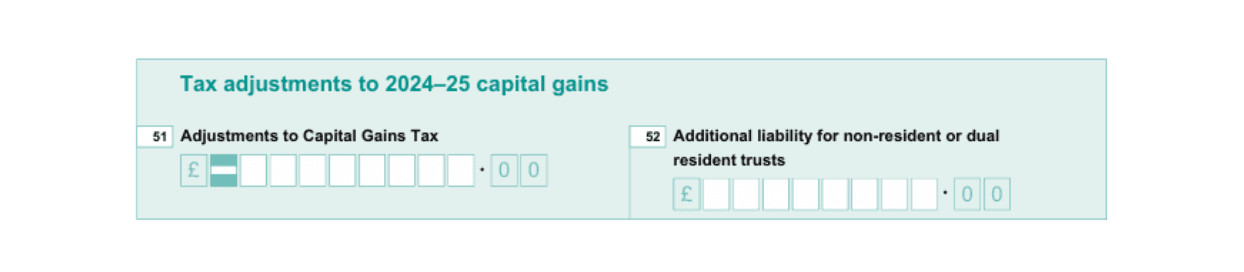
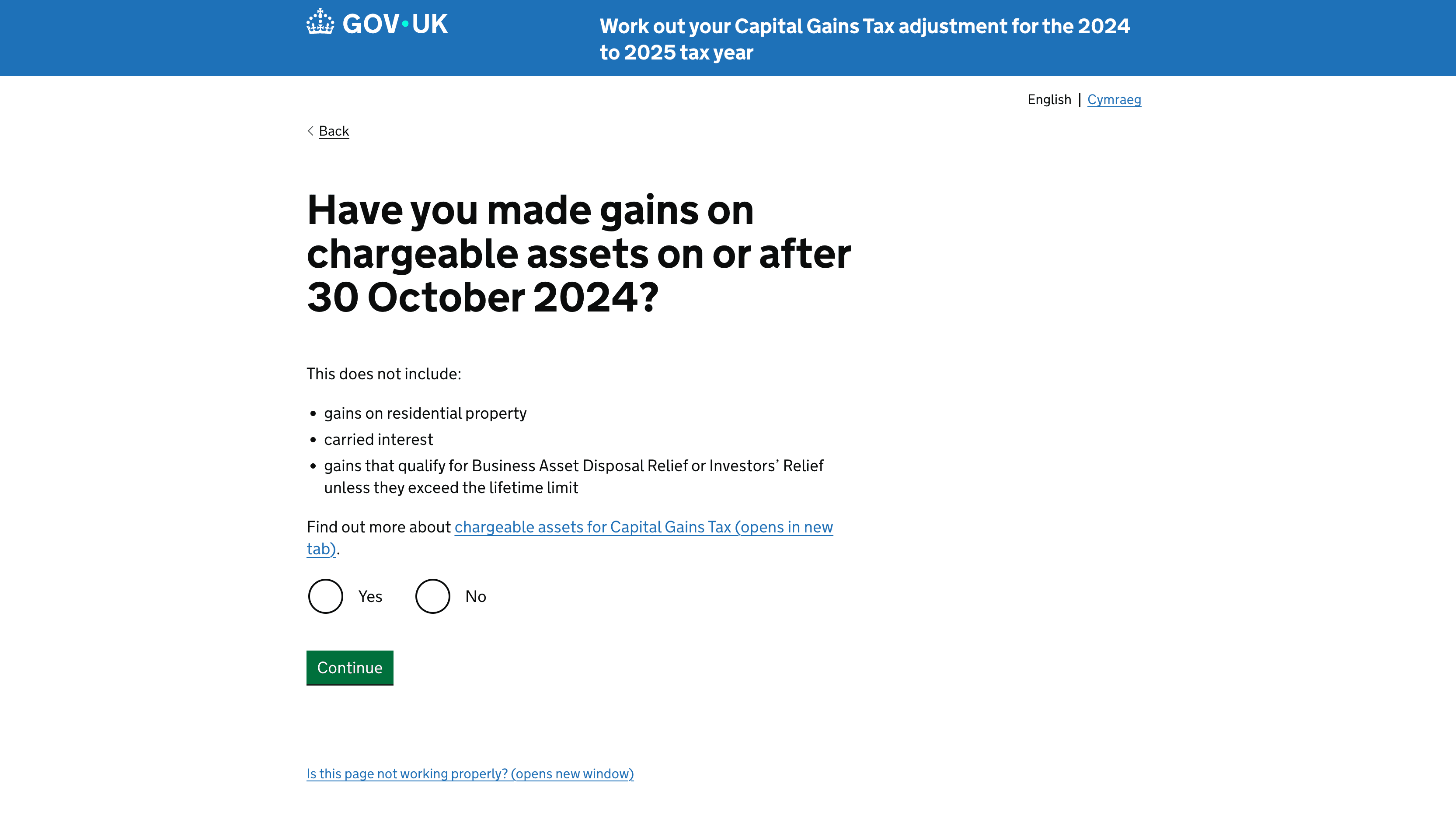
To calculate the adjustment, HMRC requires you to use its online CGT Adjustment calculator. You enter all relevant pre- and post-30 October gains into the tool, and HMRC calculates the final adjustment amount.
The output of that calculator is the only figure you enter in Box 51.
Once you have the result, go to the Capital Gains Summary in your return and enter the calculated adjustment manually into Box 51.
Before submitting, check that:
the figures taken from CryptoBooks were entered correctly into the HMRC calculator,
any non-crypto disposals were included,
the calculator result matches exactly what you entered in Box 51.
It is normal for Box 51 not to match the taxable gain shown in your CryptoBooks SA Summary. The SA Summary remains the reference for SA108 totals, while Box 51 is a separate adjustment figure specific to 2024/25. If all your gains occurred after 30 October 2024, or if your pre-30 October position results in no adjustment, Box 51 may be zero. Even in those cases, the calculator must still be run.
Step 5: final checks and submit your return
Before submitting your Self Assessment, carry out one final consistency check. The goal at this stage is simple: every figure entered in HMRC’s return should align with your CryptoBooks SA Summary. This is the most effective way to avoid discrepancies that can trigger follow-up questions from HMRC.
Focus on three areas:
SA100 (income): if applicable, confirm that the amount entered for crypto income matches the Taxable income figure shown in your CryptoBooks SA Summary;
SA108 (capital gains): check that the totals entered for disposals, proceeds, allowable costs, gains and losses reflect the aggregated figures in the CryptoBooks report;
Box 51 (CGT Adjustment): confirm that the value entered matches exactly the result produced by HMRC’s CGT Adjustment calculator, based on the pre- and post-30 October figures from CryptoBooks.
If any figure does not match, go back to the relevant section and correct it before proceeding.
Also take a moment to ensure that crypto amounts have only been entered once and in the correct place. Income should appear only in SA100 where applicable, and disposals only in SA108. Duplicate entries are a common source of errors.
Once everything is consistent, proceed to the final declaration, confirm that the return is complete and accurate, and submit it. HMRC will display a confirmation screen and issue a submission receipt.
After submission, retain your CryptoBooks SA Summary and underlying transaction history. HMRC may request supporting evidence years after the return is filed, and these documents form the audit trail for your crypto reporting.
Closing the loop and preparing for future filings with CryptoBooks
Completing SA100, SA108 and Box 51 means your Self Assessment now reflects the exact disposals, costs, gains and income shown in your reconciled CryptoBooks report, together with the CGT Adjustment calculated using HMRC’s tool. At this point, accuracy is not only about the numbers entered, but about the underlying audit trail. HMRC can request evidence of calculations, transaction records or valuation methods, and CryptoBooks already provides the structured dataset needed for that review. Keeping the SA Summary, the disposal breakdown and the original wallet and exchange records is therefore part of the filing process.
From here, the most effective step is to keep your data pipeline stable. Maintain API or CSV connections, resolve alerts as they arise, and let CryptoBooks track disposals, costs and income continuously rather than reconstructing everything at year-end. When the next tax year closes, your SA report will already reflect a complete, reconciled history, and the process outlined in this guide becomes routine rather than a one-off exercise.
Other contents for you
Taxation
08/08/2025
Crypto tax in the UK: what you need to know (2025 Guide)
Understand UK crypto tax rules for 2025. HMRC guidance, rates, allowances and how to report gains and income from crypto.
Taxation
19/08/2025
How to fill in Box 51 for crypto CGT
Box 51 is now key for crypto in 2024/25. HMRC requires it to split gains before and after 30 Oct’s CGT rate rise, or your tax will be wrong.
Taxation
01/09/2025
How HMRC treats DeFi activities in the UK (2025 update)
How HMRC taxes DeFi lending, staking and liquidity in the UK. Current rules trigger CGT on disposals; proposals may shift to income-only returns.
Taxation
16/09/2025
UK crypto staking tax 2024/25: how to report rewards and gains
Earn crypto through staking? In the UK rewards are taxable income and disposals may trigger CGT. Learn how to report them and use allowances.
We specialise in cryptocurrency bookkeeping
CryptoBooks calculates taxes on your cryptocurrencies with 100% accuracy, giving you the peace of mind of precise tax reports, ready to hand straight to your accountant.

Connect and reconcile all your platforms and wallets
You can connect all your platforms and wallets to CryptoBooks: the already integrated connections exceed 500, both through APIs and CSV. And if you don't find what you're looking for, you can create custom connections.

Monitor and verify your cryptocurrency transactions
Use guided procedures to resolve discrepancies quickly and effortlessly.

Download your cryptocurrency tax reports
Export your cryptocurrency tax reports for your accountant or use them directly in your Income Tax Return, as they are accurate and fully compliant with current UK tax laws
Connect, track, account, and reconcile all your crypto transactions for the most accurate tax reports you can get.
PLATFORM

RESOURCES
COMPANY
LEGAL

UK
